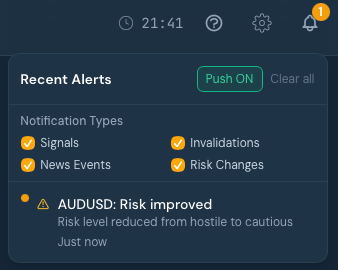
REVDEN Max users can now receive real-time push notifications for trading signals, risk changes, and high-impact news events — even when the app is minimized.
Once installed as an app (PWA), REVDEN runs independently from your browser and keeps you informed in the background.
⸻
📱 Setup on iPhone / iPad 1. Open revden.io in Safari 2. Tap the Share button (square with arrow) 3. Select “Add to Home Screen” 4. Open REVDEN from your new Home Screen icon (not from Safari) 5. Tap the bell icon in the top right 6. Tap “Enable Push” and allow notifications
Important: Push notifications only work when REVDEN is opened as a Home Screen app.
⸻
🤖 Setup on Android / Desktop 1. Open revden.io in Chrome 2. Tap or click the bell icon in the top right 3. Select “Enable Push” and allow notifications
On desktop, you can also install REVDEN via the browser’s “Install App” option for a standalone experience.
⸻
⚙️ Notification Types
You can fully control what you receive inside the bell menu under “Notification Types”: • Signals — New trading signals • Invalidations — Signal invalidations • News Events — Upcoming high-impact economic events • Risk Changes — Risk level changes for your favorites
Enable only what matters to you.
⸻
Push notifications are available exclusively with the REVDEN Max plan.