 FX Volume Understand the Market
 The real positioning behind every major currency.
FX Volume captures the real trading volume behind the eight major currencies: live retail positioning, flipped to show the counterparty's side, the institutions taking the other end of every retail trade. When the crowd piles in one way, you see where the side that usually wins stands. MT4 and MT5, with data delivered through SI Connect.

Where it came from
Three answers from Daniel.
The gap
Price sat on the chart. Volume stayed hidden, and the crowd is wrong more often than right.
The idea
Real retail positions from many brokers, first in two views. The retail side runs against the market so reliably that we show only the other.
What makes it special
Volume, demand and direction per currency, like strength in FX Power. The only one I know of.
Watch the tutorial
About FX Volume
The retail crowd is, more often than not, on the wrong side of the move. The institutions taking the other side of those trades know exactly where the crowd sits. FX Volume gives you that same vantage point. It captures the real trading volume of the eight major currencies (live retail positions, aggregated anonymously across many brokers) and shows it to you from the counterparty's side. When the crowd is 80% long EUR, FX Volume reads EUR as a sell, because that is how the side holding the other 80% is positioned.
Key Features
- Real trading volume of the eight major currencies plus Gold, drawn from live retail positions across many brokers
- The counterparty view: retail positioning flipped to the side that takes the other end of the trade
- Long, Short and Net Long figures per currency, refreshed every minute
- Five panel views: total volume, ratios, net long, net long % and net long delta
- Historical volume lines that track how positioning shifts over days and weeks
- Symbols panel for delta analysis across pairs
- Currency-level alerts when volume or positioning moves past a threshold you set
- Volume data delivered through SI Connect; runs on both MT4 and MT5
How traders use it
Most traders run FX Volume as a macro filter before entering a position. Because the reading is already flipped to the counterparty's side, you trade with it: when that side is buying a currency, you look for longs; when it is selling, you look for shorts. When FX Volume and your own price read point the same way, the trade has confluence behind it; when they pull against each other, that is the cue to pause.
The historical volume lines are where slow shifts show up: the kind that build over weeks before they are obvious in price. A currency under steady accumulation sits in a different environment from one being sold off. And when you are choosing between similar setups on related pairs, the delta analysis in the symbols panel gives a quick side-by-side read.
Supported markets
Forex: the eight major currencies (USD, EUR, GBP, JPY, CHF, CAD, AUD, NZD) plus Gold (XAUUSD). Volume data covers these instruments only.
Getting started
FX Volume draws its data through SI Connect, so SI Connect needs to be installed and running first: it is the service that brings the volume data into your terminal. Once it is connected, FX Volume populates on the next refresh. The setup walkthrough at https://youtu.be/LHCzXca3PQI covers the full sequence, SI Connect included.
From signal to trade.
Ready-made strategies from our workshop, with videos and chart templates, so you can start right away.
A complete manual trading system built on FX Volume and FX Power NG. Institutional volume changes reveal which currency is attracting interest, FX Power confirms whether that interest translates into actual strength. When volume, positioning, and strength all align, the setup fires - and the win rates across documented trades speak for themselves.
See the strategyCombines FX Volume positioning data with FX Power strength readings to catch reversals. When institutional net long volume rises but currency strength temporarily drops, a snap-back is likely. This divergence pattern offers entries with strong risk-reward at the point where strength realigns with positioning.
See the strategyWhat traders say
Real reviews, public on MQL5 and quoted word for word. Each tile links to its source.
Works great with
FX Power reads currency strength from price; FX Volume reads it from where the volume actually sits. Run FX Power alongside it, and a currency strong on both counts is a higher-confidence read. Once the directional case is built, Power Candles times the entry on the chart. Custom Alerts can watch FX Volume's data through its own strategies, widening the alerting beyond the built-in currency thresholds.

Frequently asked questions
1. Why FX Volume?
Your Edge in the Forex Market
By providing real trading volumes (long and short positions) aggregated from brokers worldwide, FX Volume delivers actionable insights into market sentiment. With FX Volume, you can:
- Spot trends early and act with confidence.
- Confirm or challenge price action with real data.
- Avoid the pitfalls of retail trading traps.
Trade Smarter: Read the Crowd You Trade Against
Did you know that over 70% of retail traders lose money? FX Volume shows you how retail is positioned, the crowd on the other side of your trade. When retail is 80% long a pair, that one-sided positioning is the signal. FX Volume makes it visible so you can decide whether to trade with the crowd or fade it.
Understanding Tick Volume vs. Real Trading Volume
In MT4/MT5, tick volume counts the number of price changes within a specific time frame but lacks information on trade direction and size. This metric varies significantly between brokers, leading to inconsistent indicator results and unreliable data for trading strategies.
In contrast, FX Volume provides real retail trading volume data, including trade direction and size, offering consistent and actionable insights across all terminals and brokers.
For a detailed analysis, read our article on Real Volume vs. Tick Volume.
Key Insights from Volume Trends
- Rising Volume: Indicates market stability and confidence, reinforcing trends.
- Falling Volume: Suggests market instability, signaling caution.
Practical Example
- Bullish Signal: GBP long ratio rises by +5%, with increasing GBP volume, indicating a supported upward move.
- Bearish Signal: GBP long ratio drops by -5%, with increasing GBP volume, indicating a likely downward trend.
2. Simple Setup, Seamless Operation
Install SI Connect EA and Get Started Quickly
To access real-time data, install the SI Connect EA. It's quick, simple, and ensures smooth operation.
Time Settings Made Easy
When the market is open, FX Volume automatically determines and applies the correct GMT and DST settings, ensuring perfect alignment with your broker's data. SI Connect also displays your terminal's active GMT/DST settings in its status panel for reference.

However, for weekends or backtesting, FX Volume users need to set these parameters manually in the indicator settings, as the market is closed, and automatic detection isn't possible during these times.
Allow Data Access
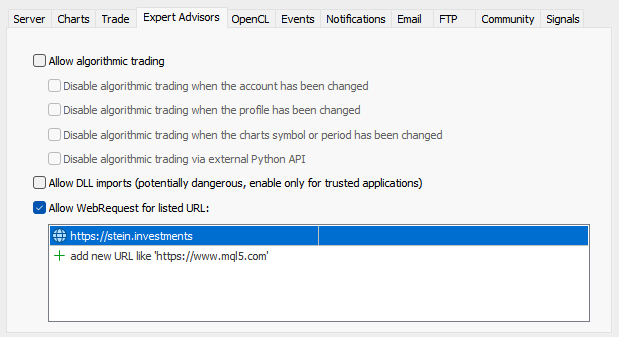
Add https://stein.investments to the list of allowed URLs in your Metatrader terminal properties. This quick step ensures uninterrupted data flow, keeping your charts live and accurate.
3. Real-Time Insights: Trade with Confidence
Stay Updated, Always
FX Volume runs on servers that record data 24/7. Even if your terminal is offline, the latest data syncs seamlessly to your charts once you reconnect.
Real-Time Advantage Over Weekly Reports
Unlike COT reports, which provide weekly summaries, FX Volume updates in real-time. This makes it ideal for intraday and day trading strategies where speed and precision matter.
Customizable Alerts
Tailor alerts to fit your schedule using FX Volume's alert scheduler. Stay informed without unnecessary interruptions.
Custom Chart Templates
Enhance your analysis with our ready-to-use chart templates for the Volume Power Trading System. Download them here.
4. How FX Volume Works: Behind the Scenes
Market Data Collection
FX Volume aggregates data from multiple brokers worldwide, summarizing millions of trades into clear, actionable insights. This anonymous data reveals:
- How retail traders are positioned.
- Which currencies are actively traded.
- Whether volume trends support or contradict price movements.
Why Volume Data Matters
FX Volume uses live data combined with historical trends to give a complete market picture. By comparing long and short positions across currencies, it shows whether a market trend is truly supported by volume.
5. Use FX Volume to Spot Opportunities
Combine Volume and Price Action for Better Decisions
- Rising GBP long ratio (+5%) with increasing GBP volume → Bullish signal.
- Falling GBP long ratio (-5%) with increasing GBP volume → Bearish signal.
Can FX Volume Help Identify Low-Risk Opportunities?
While no strategy is completely risk-free, FX Volume provides real-time insights into retail trading volumes, helping you spot strong volume trends across currency pairs. These trends can indicate market-driven movements, offering opportunities to trade with tighter stop-loss levels and reduced risk. For a detailed example, read our article on minimizing trading risk with FX Volume.
Divergence Trading Simplified
FX Volume is an excellent tool for divergence strategies, helping you identify optimal entries. Learn more here.
How to Interpret FX Volume Data After News Events
FX Volume can reveal critical insights into market behavior following news events. Market-driven movements often indicate genuine trends, while news-driven reactions may signal potential reversals or corrections. For a detailed breakdown of interpreting volume data in such scenarios, read our article on FX Volume and Post-News Analysis.
Sentiment Analysis with Net Long Volume
Net Long Volume shows the balance between long and short positions, helping you quickly gauge market sentiment and potential direction.
Understanding the Net Long Delta in FX Volume
The Net Long Delta provides a historical view of net long positions for each symbol, calculated using the net long data of the underlying currencies. This ensures maximum accuracy and helps traders track shifts in market sentiment over time. For more details and practical examples, read our article on leveraging the Net Long Delta.
6. Advanced Tools for Developers
Fully EA-Compatible
FX Volume integrates seamlessly with your Expert Advisors. Use iCustom to fetch real-time data and calculate metrics like percentage changes for automated strategies.
string FXV = "::Indicators\Market\FX Volume.ex4"; double TotalVolumeNow = iCustom(_Symbol, PERIOD_M1, FXV, ..., 9, 0);
double TotalVolume8HoursBefore = iCustom(_Symbol, PERIOD_M1, FXV, ..., 9, 480);
double ChangeInPercent = (100 * TotalVolumeNow / TotalVolume8HoursBefore) - 100;
Testing in MT4 Strategy Tester
Want to test FX Volume in a controlled environment? Follow these steps:
- Open your MT4 data folder.
- Copy the SI Lab folder from MQL4\Files .
- Paste it into tester files .
- Start your strategy test to analyze results.
7. FAQs: Your Questions Answered
Do I Lose Data When My Terminal is Closed?
No. FX Volume servers store data 24/7. When you reconnect, your terminal automatically syncs with the latest updates.
How Is FX Volume Different from COT Reports?
COT reports provide weekly data for long-term strategies. FX Volume updates in real-time, making it perfect for intraday and day traders.
Is this institutional volume data?
No. True institutional feeds are prohibitively expensive (around $200K/year for a one-hour delay). FX Volume reads retail positioning, the counterparty side of the market, in real time and at an accessible price.
Can I Combine Alerts for Volume Changes?
Absolutely! FX Volume already comes with powerful alert options, but if you want to take things further (combining multiple instances, analysis periods, or different types of volume data analysis), Custom Alerts is the ideal solution.
- Combine Multiple FX Volume Analyses: Integrate data from several FX Volume instances or analysis periods into unified alerts.
- Access Strategy-Specific Alerts: Get tailored notifications for various trading strategies, simplifying the process for new users.
- Enjoy Complete Customization: Adjust settings to match your trading preferences and strategy, ensuring you receive only relevant information.
Custom Alerts enhances the capabilities of FX Volume, making it easier to monitor complex analyses and implement trading strategies effectively, all while simplifying the entry for traders new to volume analysis.