Every trade you place by hand, in one click.
Risk-sized order entry, draggable SL/TP lines, news-aware safeguards and bulk position management, all on one on-chart panel. The dozens of steps you repeat every trading day become one click each. You keep the decisions, it handles the hands.
Two months of coach Max, your AI trading coach, come with every purchase. Activated with the key the Premium Trade Manager prints to the Experts log on startup.
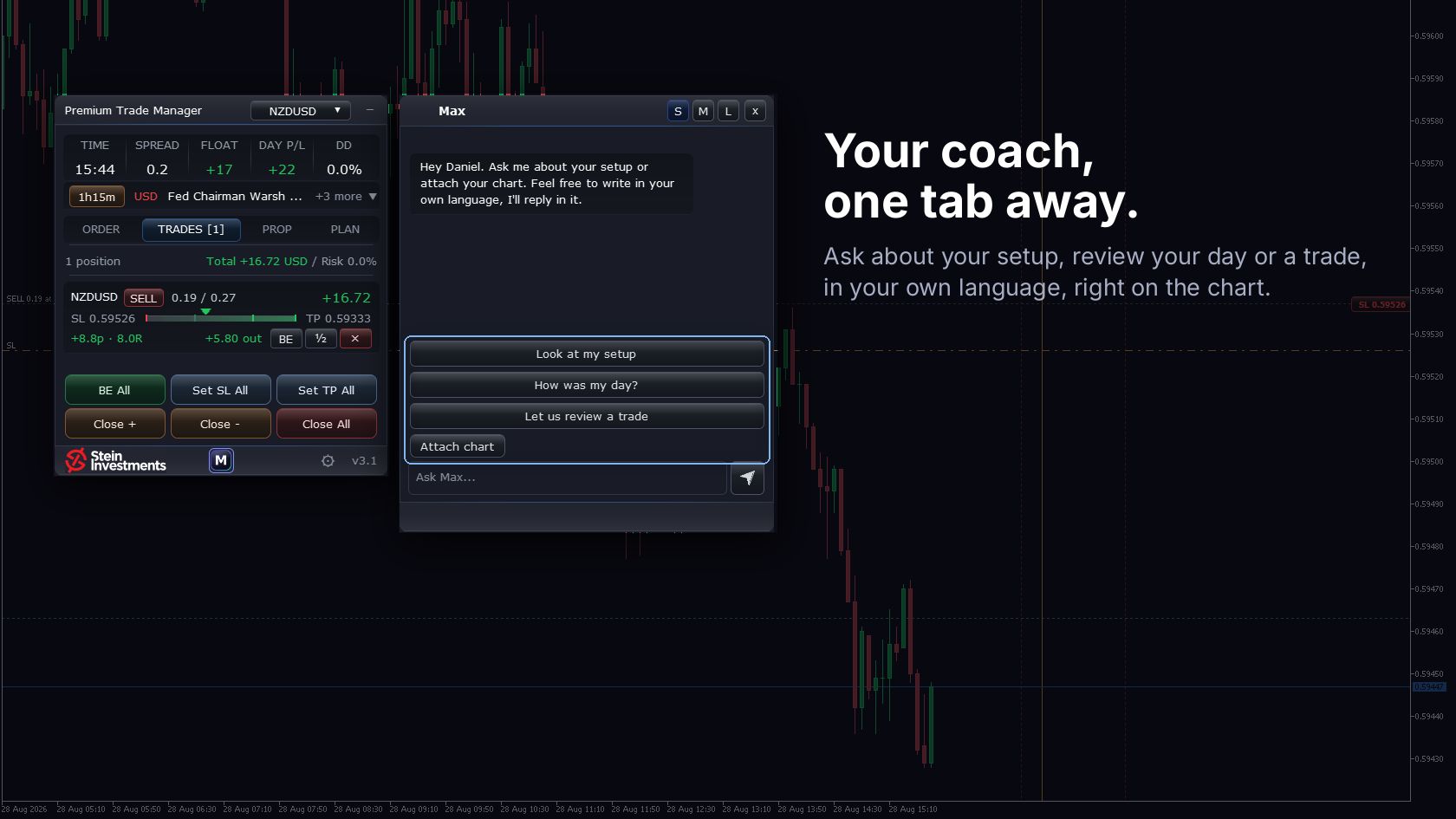

Where it came from
Three answers from Daniel.
The gap
The news rolled toward me unseen and cost me good trades.
The idea
An assistant that takes the whole preparation off my hands before a trade and points out the risks. The decision stays with me.
What makes it special
The cherry on top: today Max sits in the chart with me and advises actively during the analysis.
What traders say
Explore the panel without installing.
This is the actual Premium Trade Manager layout. Click, switch tabs, watch how it works.
 Max, the coach in your chart, comes with an active Stein Investments membership. See membership plans
Get Premium Trade Manager
A one-time purchase on the MQL5 Market. Works with any broker, any MT5 build.
Then the busywork starts
You found the entry. Now you work out the lot size for your risk, place the order, drag the stop and target, keep the news in 40 minutes in mind, and watch the position. Every trade. By hand.
One slip is enough
One miscalculated size and the risk is wrong. One release you forgot and the stop gets run. The edge you actually found gets eaten by the execution around it.
One panel does the hands
Sizing, entry, protective lines, the news guard, bulk management, all in one click each, right on the chart.
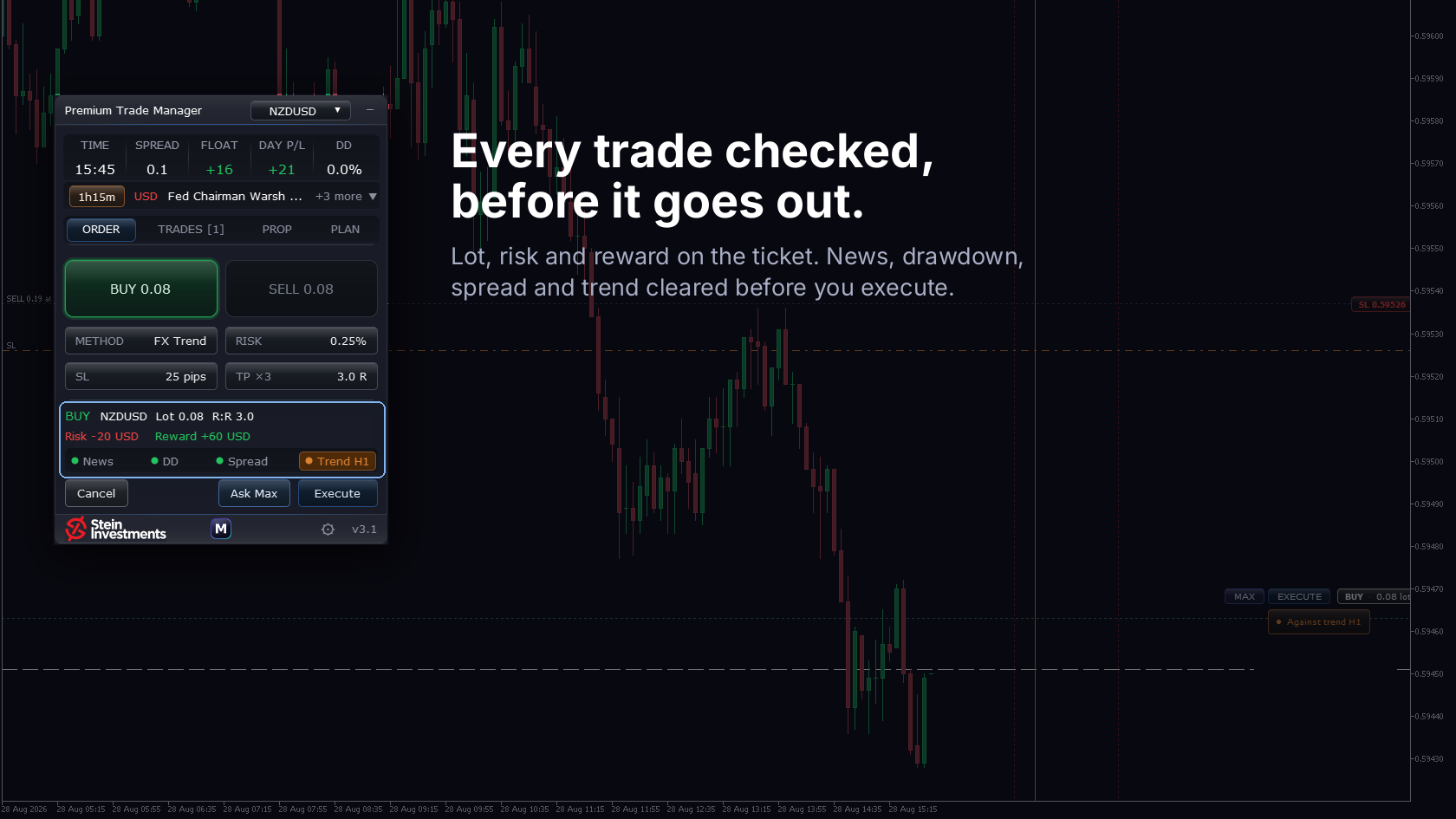
Plan on the chart, in cash
Drag entry, stop and target on the chart and watch the money at risk update live. Risk-sized lots down to the broker step, up to four partial take-profits, and a pre-trade check that lists what speaks against the trade, right under the Execute button.
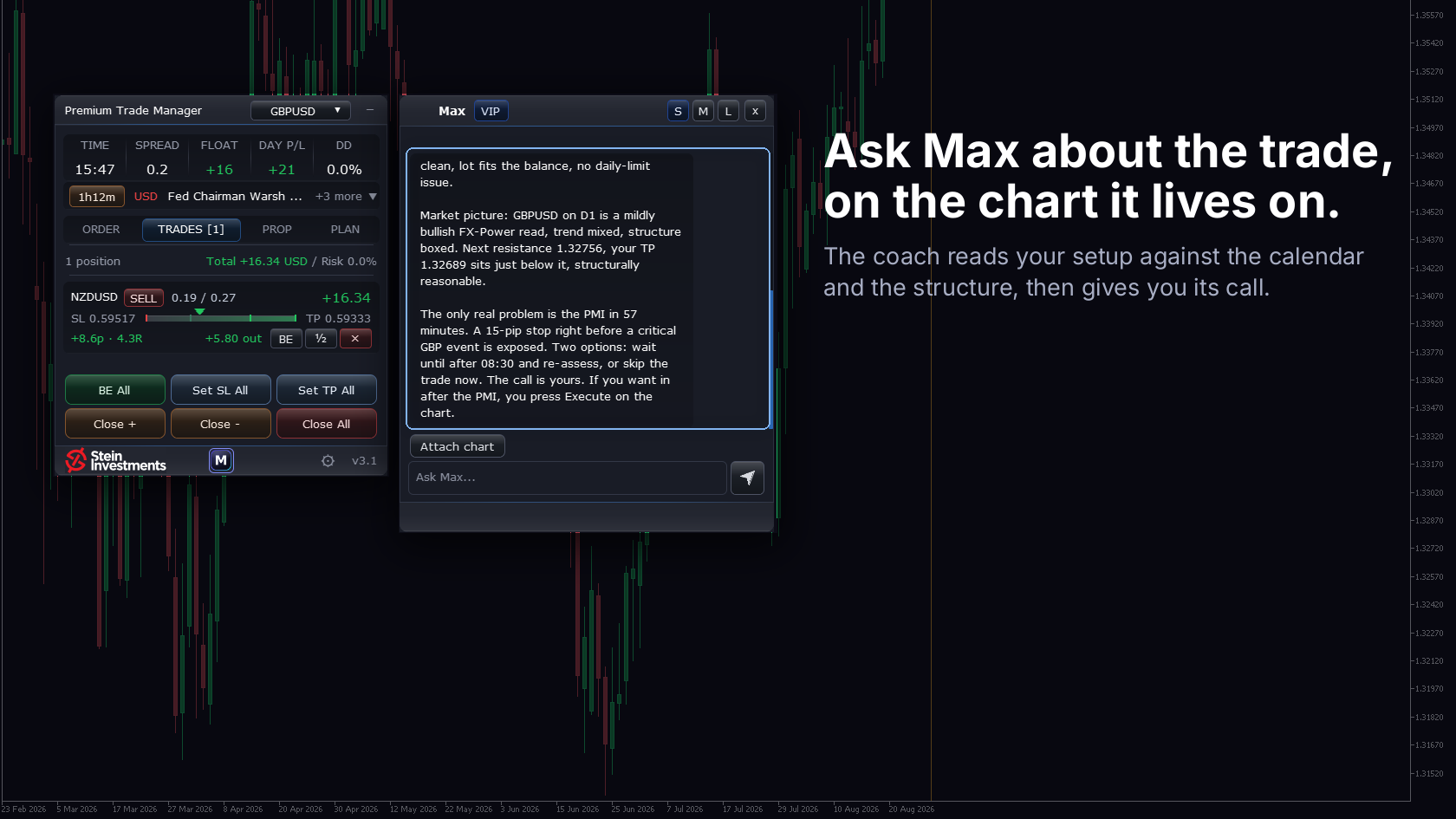
A second pair of eyes, before you commit
Every other trade manager executes your click. This one weighs it first. Set up the trade, press the Max button next to Execute, and Max reads this exact setup against your live account.
- Does the stop fit a disciplined approach for how this symbol moves
- Is the risk size sane against your account and your daily limit
- Is a high-impact news event close enough to matter
- How much room your prop limits still leave, in your language
Max is part of the Stein Investments membership and works right inside the panel. Your Premium Trade Manager license itself stays a one-time purchase. See membership plans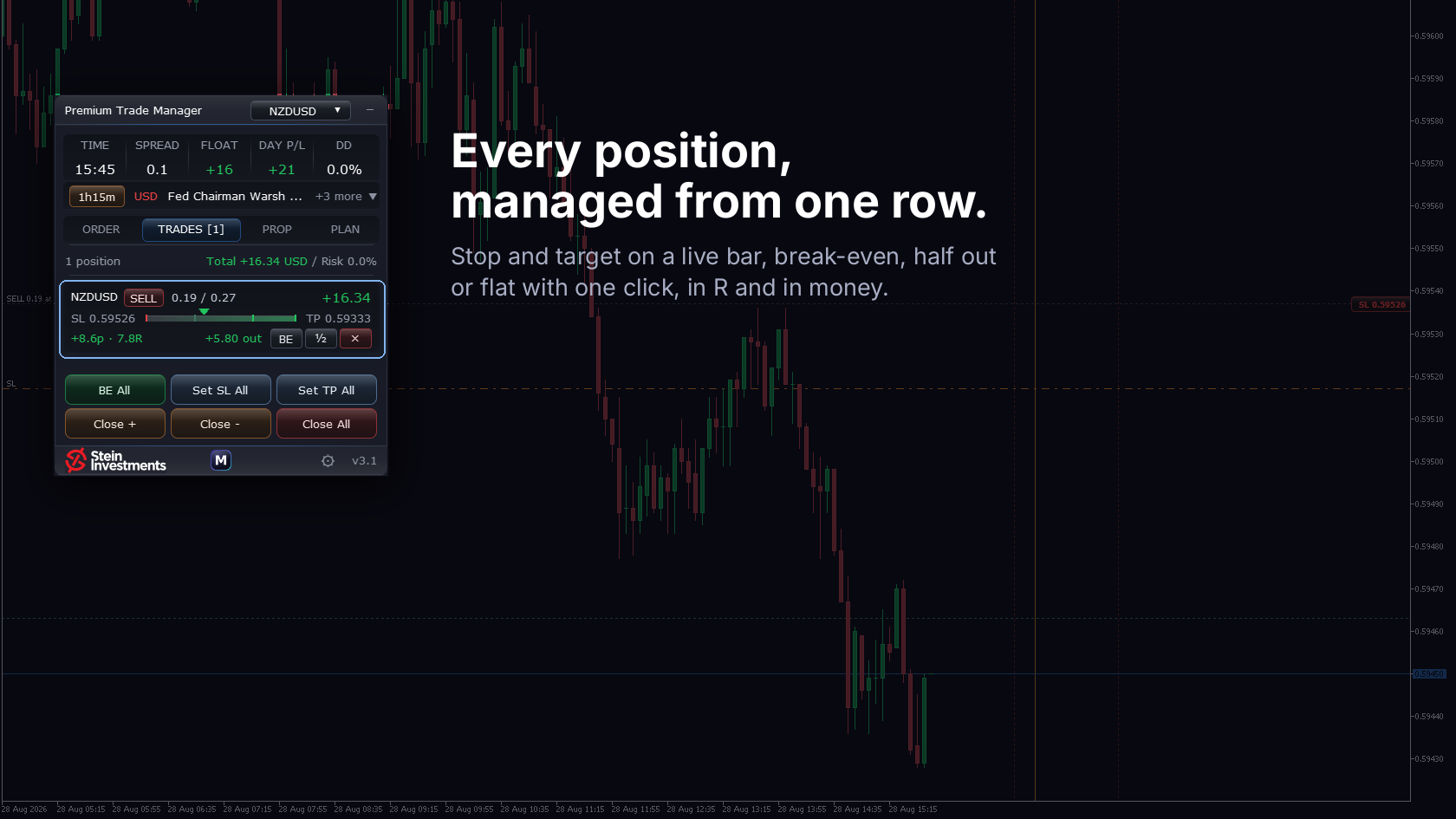
Every target, on the chart
Once the trade is live, every partial target sits on the chart with its share, its R, its distance and what it pays. Grab a level and move it: the line follows and the numbers update on the spot. Pull the stop past your entry and the trade reads risk-free, right there on the chart.
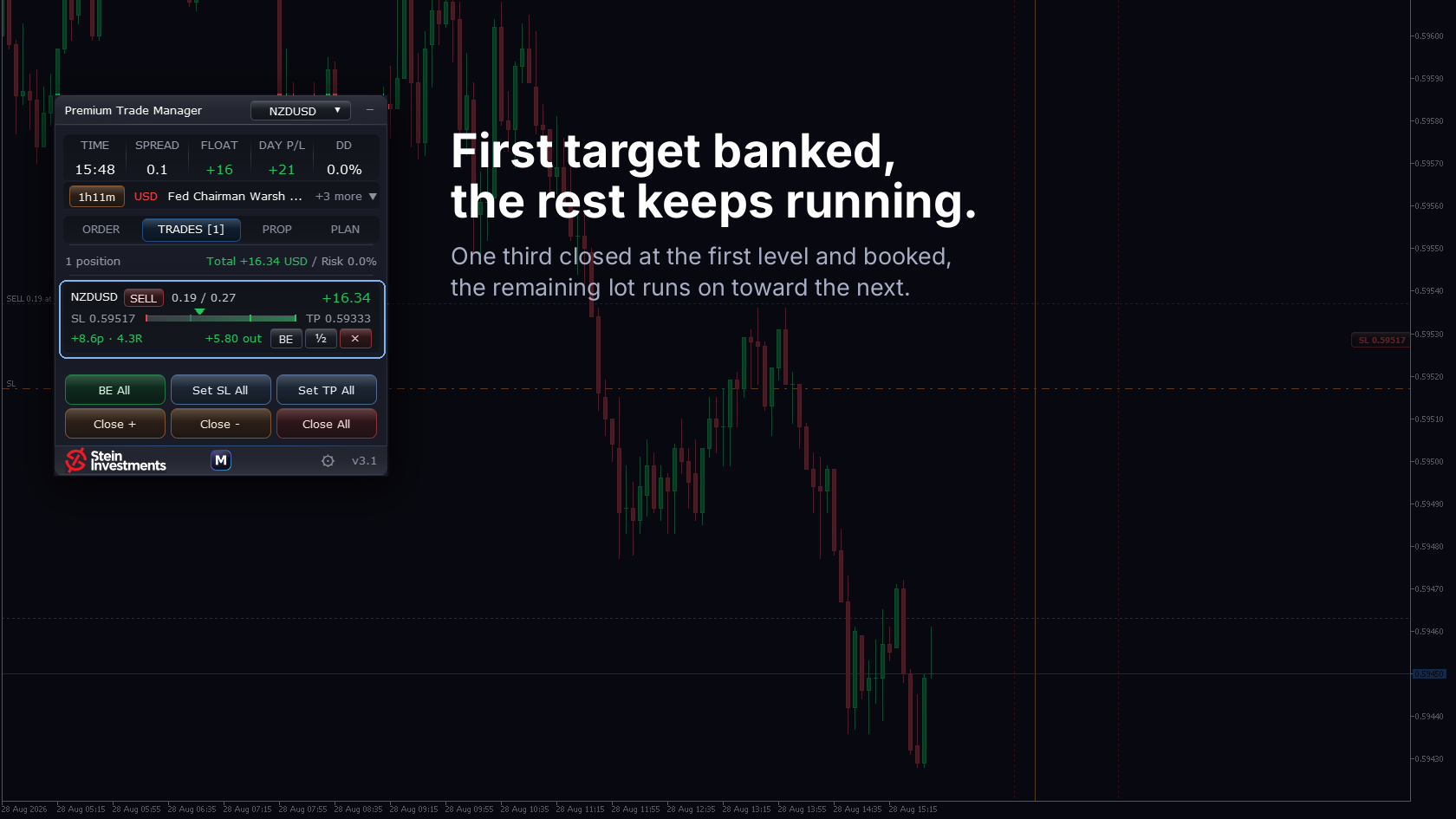
Seven ways to trail, hands-off
Once profit is banked the trailing stop carries the rest. Break-Even, Classic, Step, ATR, PSAR, FX Trend or Smart Stop, each configured on its own. The stop only ever moves in your favour.
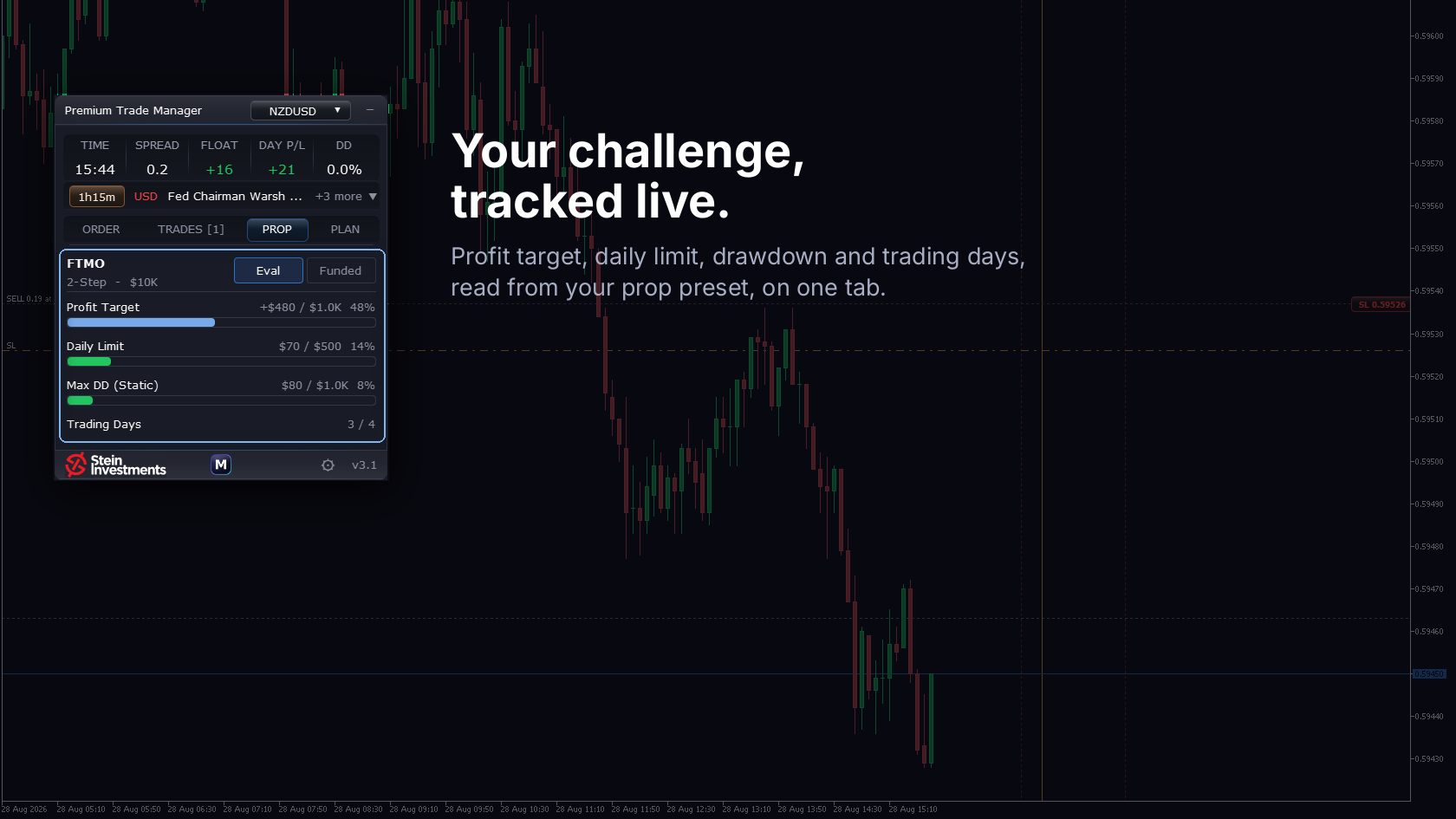
Eight prop firms, live in the panel
Pick your firm, program and account size. The panel shows your live distance to every limit, daily loss, max drawdown, profit target, trading days, and turns Execute to BLOCKED on the order that would breach a hard one.
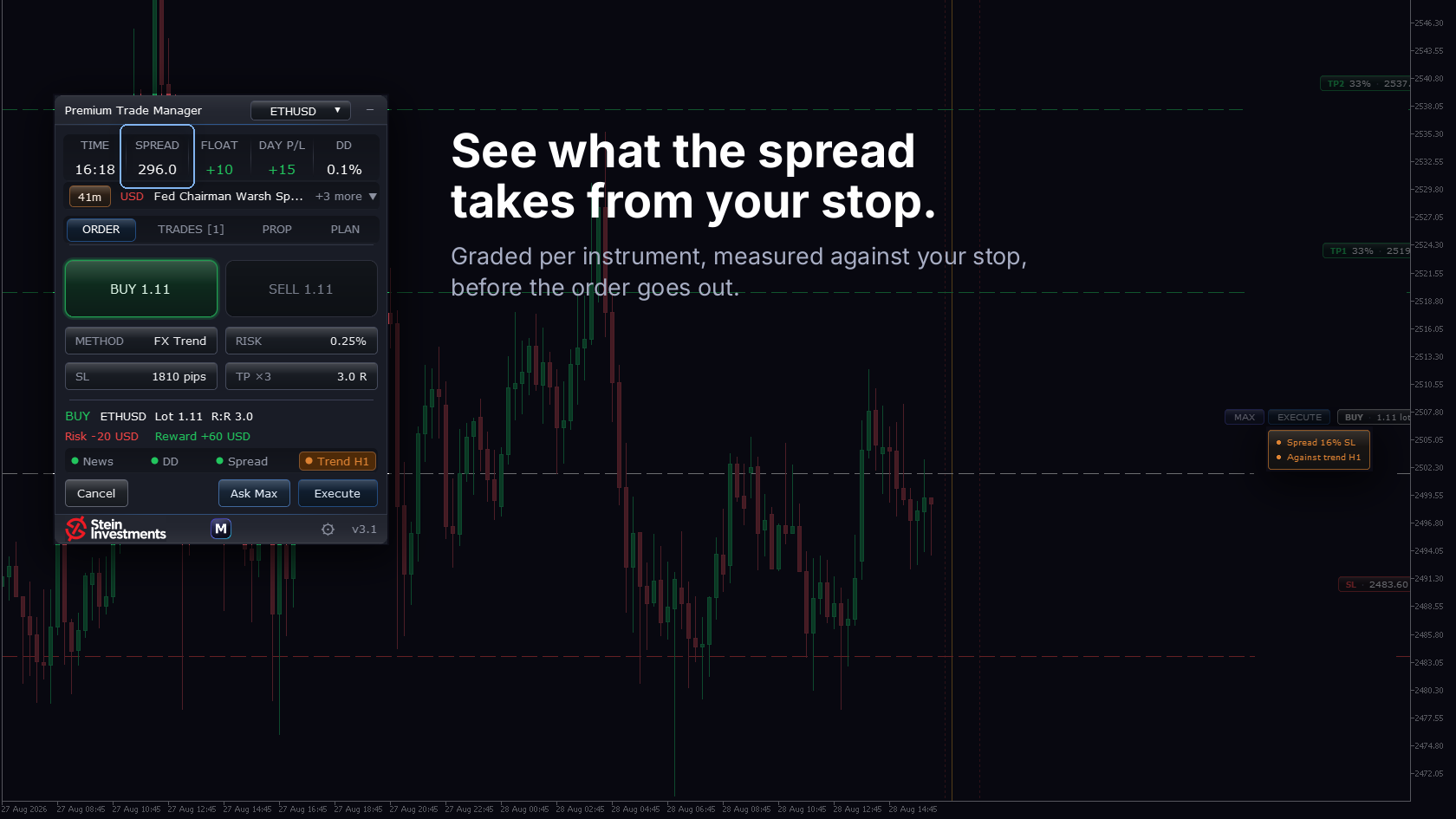
Know the true cost of every market
The status strip reads the spread on its own terms for each instrument. It learns what is normal on the symbol you trade, flags a spread that runs unusually wide, and grades the trading cost from cheap to too costly, so a market like gold reads correctly instead of looking permanently expensive. With a trade on the chart, you also see how much of your stop the spread is eating.
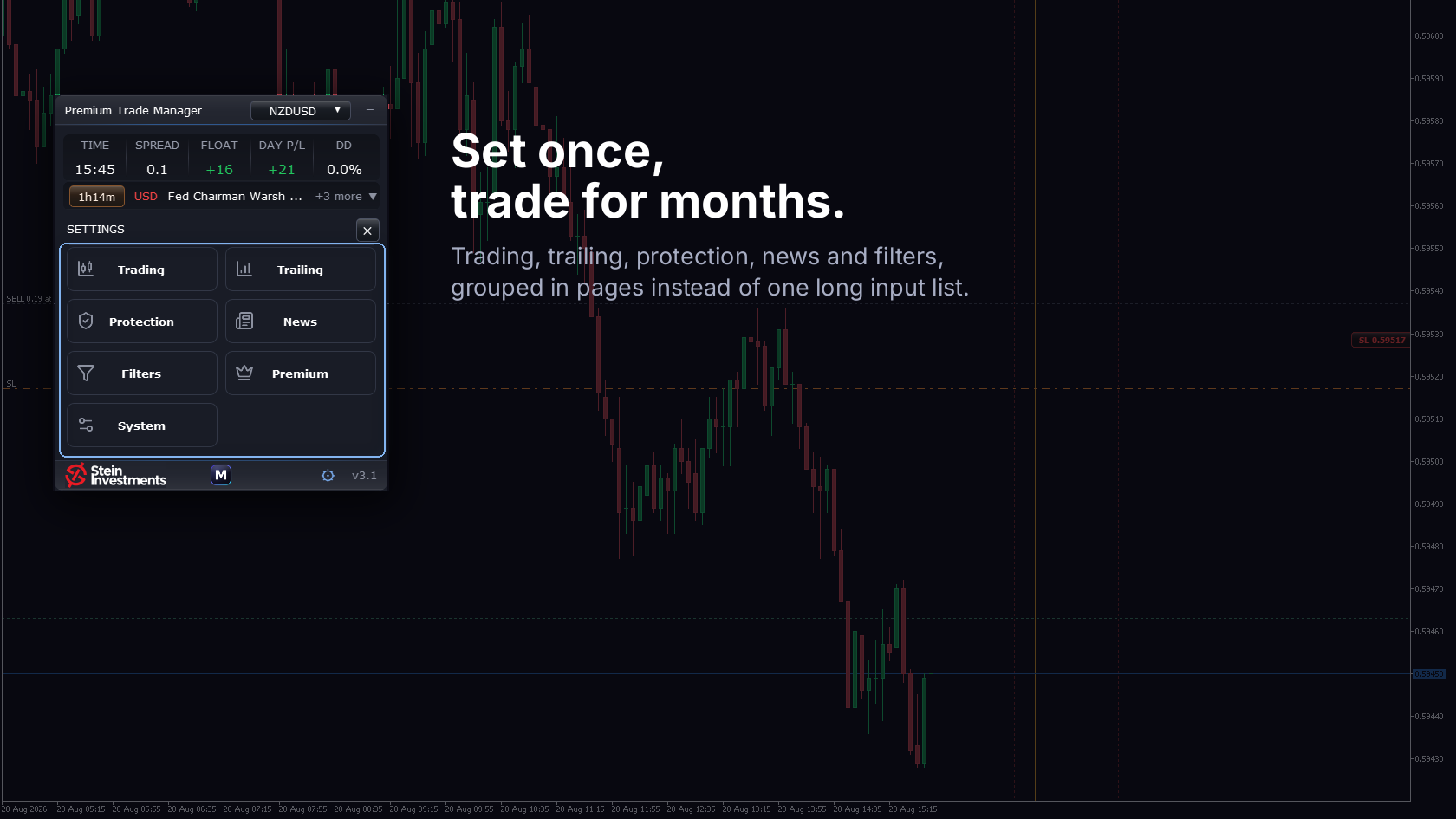
Trade your way
Risk model, lot sizing, partial take-profits and the news guard with its hard close, exactly to your rules, edited right in the panel and saved per chart. The whole settings surface in the same glass finish.
Watch the panel work.
Short clips from a live MT5 session. No voice-over, no fluff.
Risk-sized one-click entry with auto-calculated lot size.
Your panel knows your prop firm's rules.
A challenge rarely fails for lack of knowledge. It fails because the number gets done in your head, mid-trade, against the wrong anchor. The PROP tab does that math for you, live.
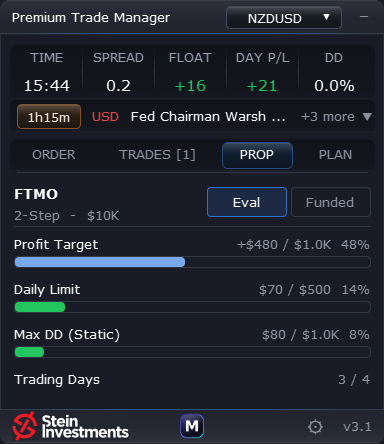
Eight forex prop firms
FTMO, FundedNext, FundingPips, The 5%ers, The Funded Trader, Alpha Capital, E8 Markets and Goat Funded Trader. Pick firm, program and account size in three steps.
Live distance to every limit
Daily drawdown, max drawdown and the profit target as bars with a percent distance, fed by your real account movement. Green while there is room, red at the limit.
Blocks the order that would breach
Reach a hard limit and the EXECUTE pill turns to BLOCKED. The panel closes nothing on its own, it stops the trade that would cross the line.
Each firm with its real rules
Static or trailing drawdown, profit target in Eval only, minimum trading days. The Eval and Funded switch surfaces the rules that apply to your exact setup. Rules update over a secured channel, no EA update needed.
News classification that moves with the market.
Other tools label news by rule of thumb. Premium Trade Manager reads a tier that is measured against what the market actually did.
News intelligence, not news pigeonholes
Most trading tools treat news events by rule of thumb: high importance gets a wide blackout, low importance gets ignored. The problem is that the importance of an event type is not constant. What made every CPI day move markets in 2022 can run almost unnoticed in 2025 once the inflation story has worked itself out. The reverse happens too: a previously second-tier release can suddenly start moving prices if the market starts watching it.
What Premium Trade Manager does differently
Premium Trade Manager reads its news classification live from the REVDEN system. REVDEN measures empirically what actually happens in the market after each event type and adjusts the tier continuously. When a category gets quieter over months, its tier drops. When another category starts moving the market, it rises. Your trades react accordingly without you needing to configure anything.
Two guards on one scale
The entry block holds a new entry back while a critical or high release is near. Hard Close on News, new since version 3.2 and off until you switch it on, goes one step further: it closes the positions the panel manages ahead of the release and deletes the pending orders behind them. You set the lead time in minutes and the scope, every position the panel manages on the account or only the symbols carrying the currency of the release. The panel announces it before it acts: the pre-check row counts down, Execute reads blocked, and the news strip turns red with the prefix "Hard close". Both guards act on the same measured tier, named in the panel under Settings > News.
Separate scale for gold
XAUUSD reacts to USD news fundamentally differently than EUR/USD or GBP/USD. A US inflation release does not move gold at the same ratio as it moves EUR/USD. Most tools ignore this and treat gold as a USD inverse. Premium Trade Manager knows the difference and uses a separate gold scale as soon as you trade XAUUSD.
Data behind it
The classification stands on a market history of over 87,000 events across 5 years, is recalculated on a regular cycle and is delivered live through the REVDEN pipeline. No extra maintenance, no update ritual, no external news feed needed. Premium Trade Manager has the current state the moment you launch it.
About Premium Trade Manager
Premium Trade Manager replaces the spreadsheet, sticky notes, and three browser tabs that most manual MT5 traders run alongside their charts. One on-chart panel handles risk-sized order entry, draggable SL/TP lines, news-aware safeguards, and bulk position management. Everything you do dozens of times a day, in one place, with one click each.
Key features
- One-click BUY / SELL with auto-sized lots, calculated from your Risk %, the active stop distance and the symbol's pip value. No Excel math.
- News intelligence: REVDEN's live economic calendar, classified by real market reaction rather than a fixed folder-color. Auto-pauses new entries around high-impact events. Switched on, Hard Close on News closes the positions the panel manages ahead of the release.
- Multi-level take-profits and trailing: up to four take-profit levels with automatic scale-out, plus Break-Even, Classic, Step, ATR and PSAR trailing.
- Chart-native trade planning: Entry, stop and target as draggable lines; stop distance from ATR, dragged, or fixed; lot / pips / R update live as you drag.
- Multi-Symbol mode: one panel manages every magic-matched position across all your charts, or just the current symbol. Set the Magic Number to 0 and it manages your manual trades as well.
- Bulk position management: a Trades tab with per-row Break-Even / Half-Close / Close, plus a bulk-toolbar (BE All, Set SL All, Set TP All, Close +/-/All).
- Daily-loss protection: closes all positions and locks trading for the day when your daily-loss limit is hit.
- Schedules, themes, first-start welcome: user-defined pause and force-close windows; Dark / Light; a welcome screen on first start.
How traders use it
The most common workflow is risk-disciplined manual entry. A trader spots a setup on GBPUSD H1. Instead of doing the lot-size math in their head, they drag the SL line to the swing-low, watch the lot auto-adjust to keep risk at 0.25% of equity, then click EXECUTE. The whole sequence takes 3 seconds.
A second common use is end-of-session cleanup. Before walking away from the desk, the trader opens the Trades tab and hits Close +. All profitable positions close, losing positions stay open with their stops. Five trades managed in one click.
A third pattern: prop-firm risk management. The Daily Loss Limit auto-locks new entries when the account hits its red-line. No more "one more trade to recover" moments. The Schedule tab pauses entry during high-volatility hours per the prop-firm's risk rules.
From install to first trade in under 3 minutes.
Install from MQL5 Market
Buy on MQL5.com. MT5 auto-downloads to your Experts folder. Works with any broker.
Attach to any chart
Drag Premium Trade Manager onto your chart, allow algo-trading. The Welcome overlay greets you with a 4-bullet primer.
Drag, click, trade
SL/TP render as chart lines. Drag to your levels, the confirm-bar shows lot/pips/R live, click EXECUTE.
Works great with
Premium Trade Manager handles execution. These Stein tools tell you what to execute.

Quick answers.
Ready to ditch the spreadsheet?
Premium Trade Manager is on MQL5 Market. Install now. First trade in 3 minutes.