 Custom Alerts Utility
 Ten proven setups, watched across every symbol.
Custom Alerts watches ten SI strategies (Dog Walk, Pair Breakout, Currency Extreme and more) across your whole symbol list and pings you the moment one triggers. The AIO version carries every required SI indicator inside it, so it works the moment you attach it. MT4 and MT5.

Where it came from
Three answers from Daniel.
The gap
My strategies were published. I still sat watching charts for the moment one lined up.
The idea
In MetaTrader, indicators cannot see each other. One watcher reads them all, knows my conditions and reports when everything fits, popup or phone.
What makes it special
Pure market monitoring. I write code or work in the garden, a message pops up, I check the chart and decide.
Watch the tutorial
About Custom Alerts
You cannot sit on every chart watching every SI indicator for the moment a setup lines up. Custom Alerts does that watching for you. It runs ten SI strategies (Dog Walk, Pair Breakout, Currency Extreme, Easy Scalping and more) across your whole symbol list, and the moment one triggers, the alert reaches you by popup, email, push, sound or GVT.
Two versions
Custom Alerts (Standard) reads from SI indicators you already run on your charts (FX Power, FX Volume, IX Power, FX Levels, FX Dynamic). The alert engine watches their data and fires when a strategy condition is met. It is the right choice if you already own those indicators.
Custom Alerts AIO (All-in-One) carries every required SI indicator inside it. One purchase, attach it to a single chart, and signals start coming in across Forex, Metals, Crypto and Indices. AIO is the fastest way into SI-powered alerts.
Key Features
- Ten alert strategies built on SI indicator signals
- Strategies include Dog Walk, Pair Breakout, Currency Dynamic, Currency Extreme and Line Delta (FX Power), Easy Scalping, Dynamic and Extreme (IX Power), and Rising Interest (FX Volume)
- ATR filter that holds back alerts on moves which have already run most of their daily range
- Five delivery channels: popup, email, push, sound and GVT
- Cooldown that keeps a sustained signal to one notification per interval
- Currency and symbol filters to keep alerts on the markets you actually trade
- Runs on both MT4 and MT5
How traders use it
The most common setup is Custom Alerts running in the background while you get on with your day. You choose which strategies apply to which symbols, set ATR thresholds to filter out noise, and pick your notification channels. When a condition triggers, the alert fires immediately on the channel you chose.
Multi-currency traders lean on the currency filters to keep alerts down to their active markets. And the cooldown handles sustained readings cleanly: exactly one notification per interval, however long the reading holds.
Supported markets
Forex pairs and Gold out of the box; crypto and indices come in when IX Power is part of the setup. MT4 and MT5.
Getting started
AIO version: attach it to any chart and it works immediately. Every indicator it needs is already inside.
Standard version: install Custom Alerts alongside your SI indicators, and confirm those indicators are attached and reading correctly before you configure strategies.
Either way, start with one or two strategies and a conservative cooldown to get a feel for the signal frequency. The tutorial at https://youtu.be/Y1zwwS7_7hU covers strategy selection and channel setup.
What traders say
Real reviews, public on MQL5 and quoted word for word. Each tile links to its source.
Works great with
The Standard version reads its signals from FX Power, FX Volume, FX Dynamic, FX Levels and IX Power; the AIO version has all five built in. Either way, when an alert flags a setup, Premium Trade Manager is the natural next step: the panel where you place and manage the trade, fast and precise, with every decision still yours.

Frequently asked questions
Custom Alerts FAQ: Setup & Detailed Explanation
Introduction
Custom Alerts is your multi-market scanner. This tool monitors all asset classes available from your broker, including Forex, Metals, Indices, Crypto, and Commodities. You no longer need to enter any symbol names manually. Simply select the asset classes you want to monitor in the settings and let Custom Alerts handle the rest. Whether you're scanning for setups across major currencies, gold, Bitcoin, or indices like the US30, this tool adapts to your market coverage.
Custom Alerts is available for both MT4 and MT5, offering real-time monitoring and fully customizable alerts tailored to your trading logic. Choose between the modular version (with external indicator support) or the AIO version with all components embedded and ready to go.
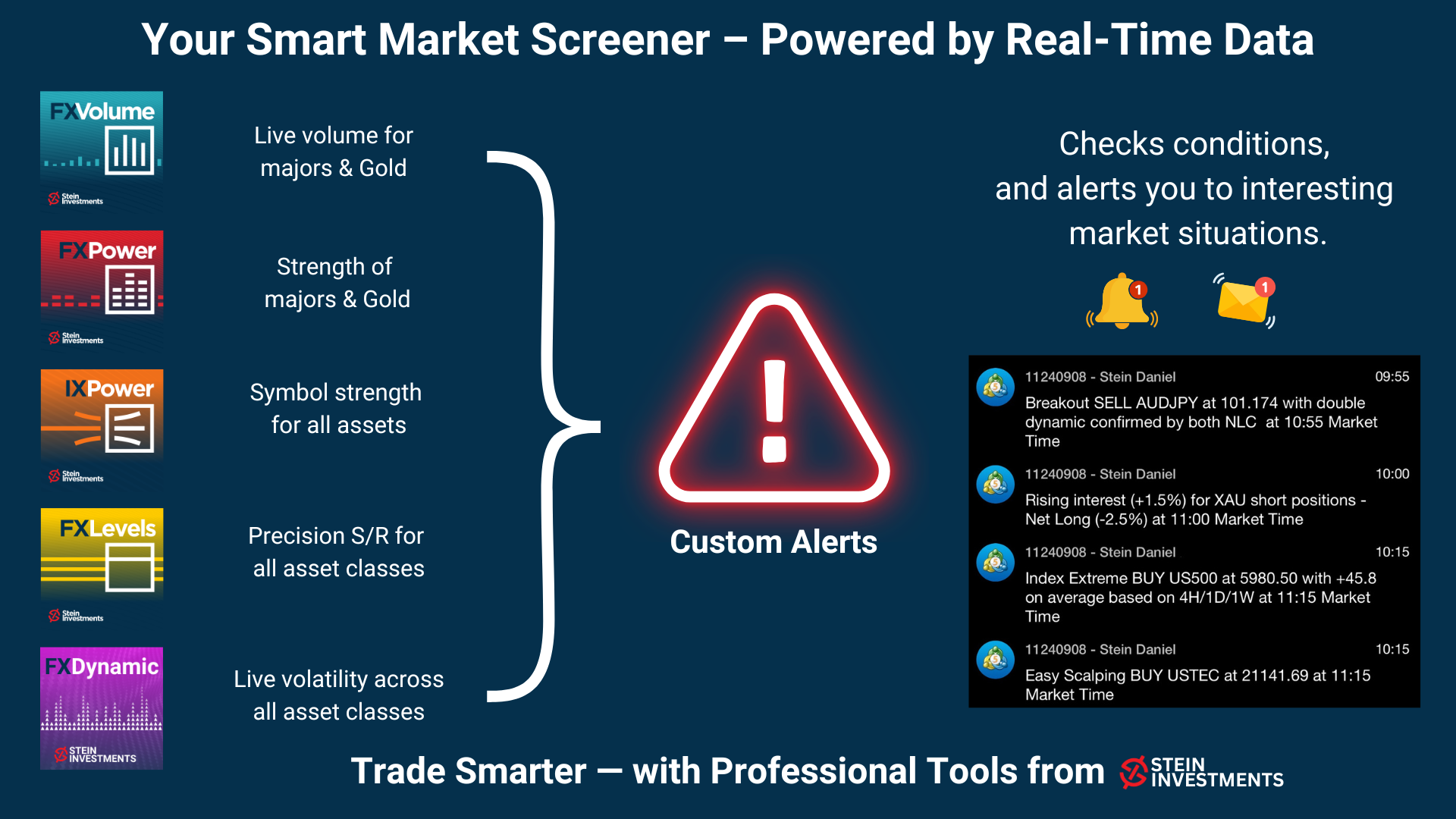
Here's an example:
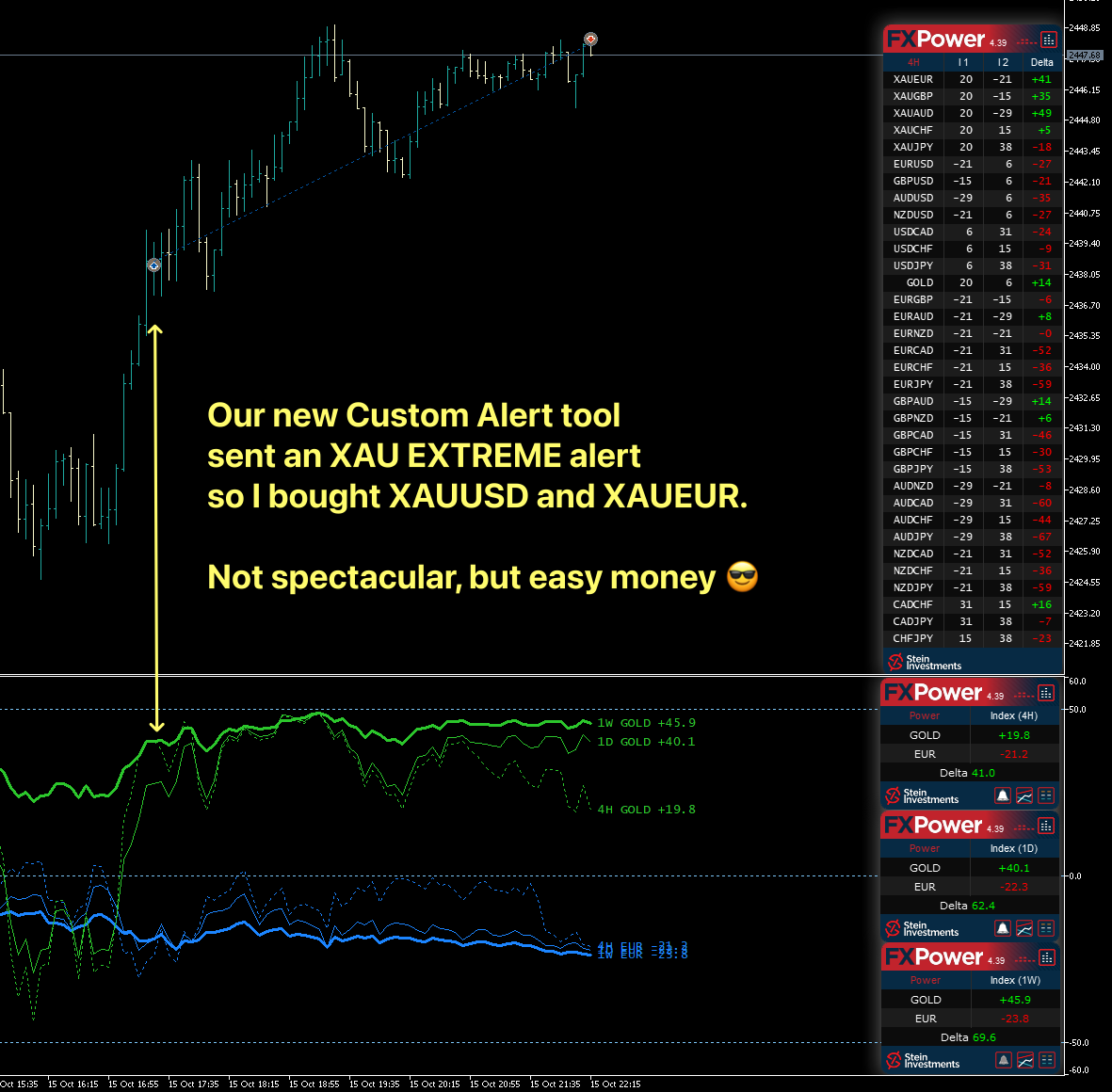
1. Basic Setup & Initial Requirements
Install the Required Indicators
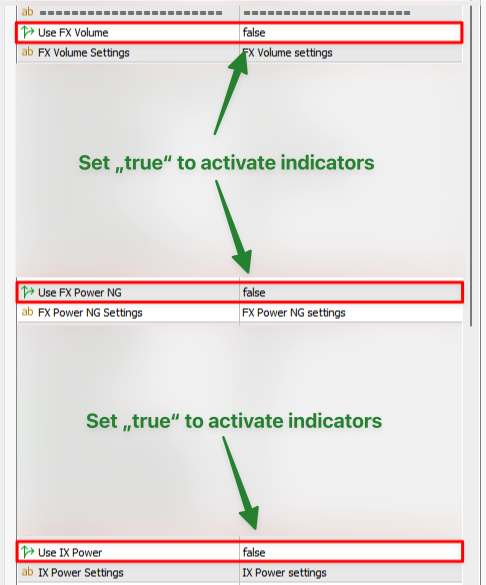
To benefit from the full capabilities of Custom Alerts, it is crucial to have the underlying indicators (e.g., FX Power, FX Volume, IX Power) already installed on your terminal. By default, all indicator requests in Custom Alerts are disabled, as we don't know which tools you're using. Enable them according to your needs.
Stand-Alone Chart / VPS Usage
We strongly recommend running a single instance of Custom Alerts on its own chart, minimized in the background, or even on a VPS if you want uninterrupted market monitoring.
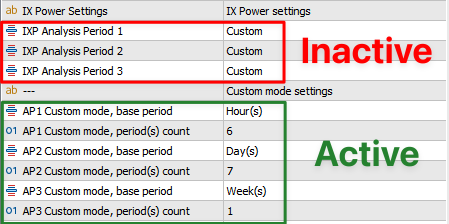
Configurable Analysis Periods
You can either use the preconfigured Analysis Periods (selectable via a dropdown) or create custom periods that suit your unique trading strategy. Using both preconfigured and custom modes simultaneously is also possible.

Alert Settings & Filters
At the bottom of the indicator properties, you'll find the Alert Settings.
Here, you can enable/disable alerts, set time filters, filter by currency or specific symbols, and more.
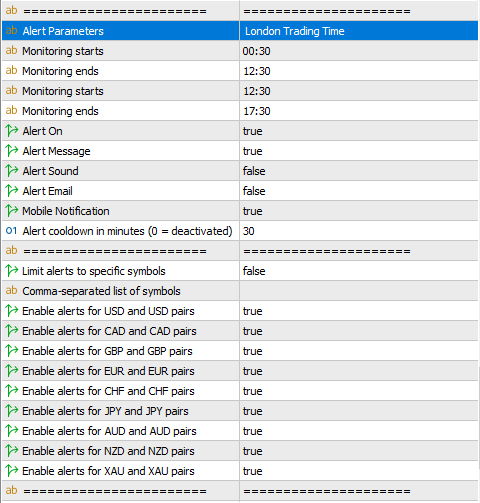
As an additional feature, you can specify a list of symbols to receive alerts only for those pairs, following the correct format shown in the example.

How Does the Alert Cooldown Work?
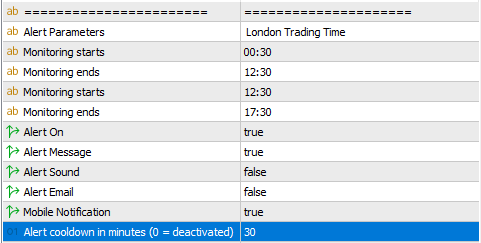
The AlertCooldownMinutes feature prevents repeated alerts for the same strategy-symbol or strategy-currency within a set time.
How It Works
- When an alert triggers, a cooldown starts for that strategy and symbol/currency.
- New alerts from the same strategy-symbol or strategy-currency are blocked until the cooldown expires.
- Once expired, alerts resume normally.
How to Use It
- Set AlertCooldownMinutes in the input settings:
- 0 (default) = No cooldown (all valid alerts sent).
- 10 = Prevents repeat alerts for 10 minutes per strategy-symbol.
- Different strategies (e.g., Breakout & Scalping) remain independent.
Example
- EURUSD triggers an Easy Scalping BUY alert at 12:00 PM.
- With AlertCooldownMinutes = 10, no further Easy Scalping alerts for EURUSD until 12:10 PM.
- Alerts from other strategies or symbols remain unaffected.
This feature helps reduce alert spam while keeping critical signals active! 🚀
We strongly recommend that you run only one instance on a separate chart, minimized in the background. Then it can do its job, and you'll get all the alerts you need.
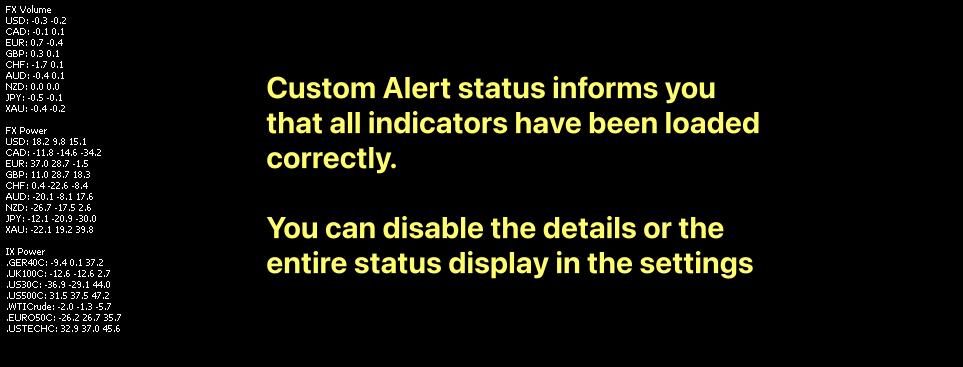
The various indicator settings are mostly self-explanatory or follow from the explanations of the alert options, so let's start with the alerts first.
2. Practical Examples & Scenarios
FX Volume: The Rising Interest Alert
Well-known from our Morning Briefing, this alert focuses on Net Long and Total Volume changes. Whenever a currency meets both conditions, Custom Alerts notifies you of its rising interest, helping you select the right currency to trade.
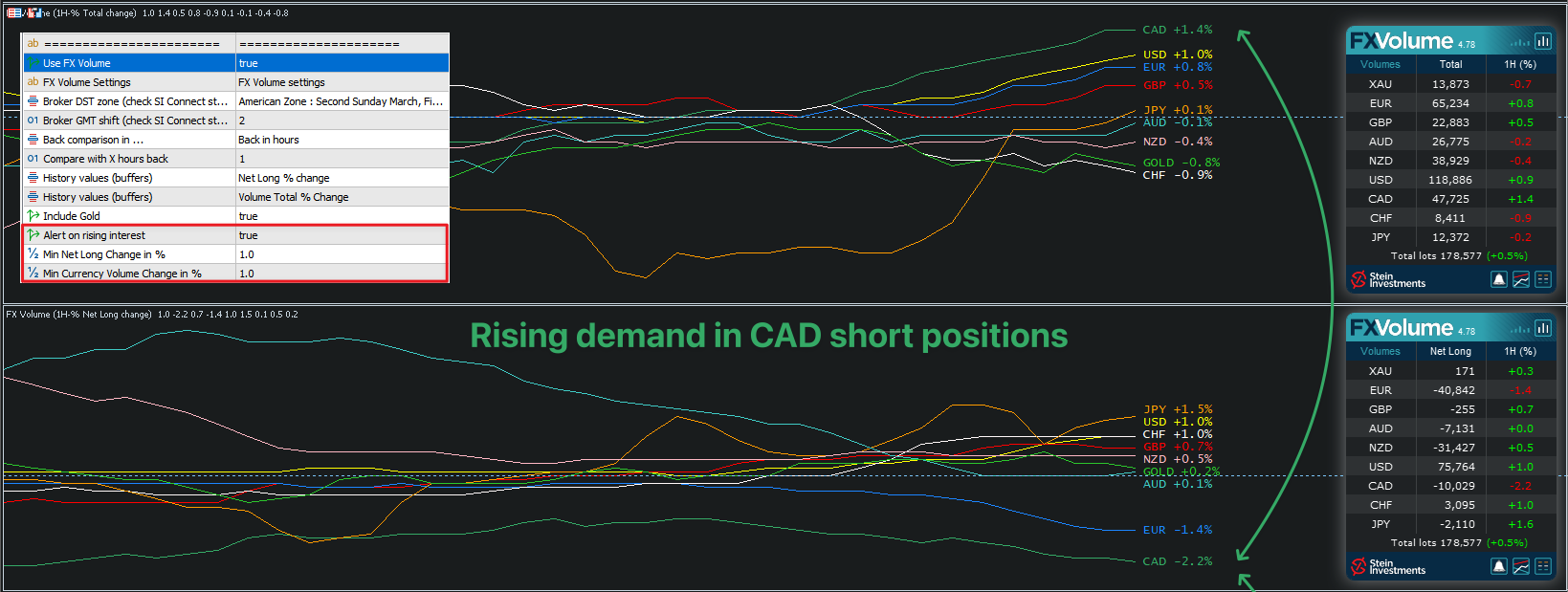
New Feature: "Filter by Dominance" in FX Volume Alerts
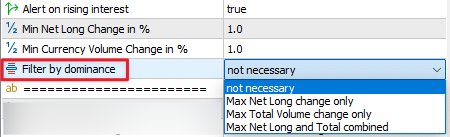
The "Filter by Dominance" option allows you to refine your FX Volume alerts by notifying you only when a currency shows the most dominant volume change. This helps reduce unnecessary alerts and ensures you focus on the most significant market movements.
How It Works
You can select from three filtering options:
1️⃣ Max Net Long Change Only: An alert is triggered only for the currency with the highest Net Long Volume Change in absolute terms.
2️⃣ Max Total Volume Change Only: An alert is triggered only for the currency with the highest Total Volume Change in absolute terms.
3️⃣ Max Net Long and Total Combined: An alert is triggered only if a currency is dominant in both Net Long Volume Change and Total Volume Change.
Example
| Currency | Net Long Volume Change | Total Volume Change |
|---|---|---|
| USD | +15,000 | 50,000 |
| EUR | +20,000 | 45,000 |
| GBP | +12,000 | 55,000 |
- If "Max Net Long Change Only" is selected, you will receive an alert for EUR (highest Net Long Volume Change at +20,000).
- If "Max Total Volume Change Only" is selected, you will receive an alert for GBP (highest Total Volume Change at 55,000).
- If "Max Net Long and Total Combined" is selected, no alert will be triggered because no single currency is dominant in both categories at the same time.
This ensures that alerts are only sent when a currency clearly stands out as the most significant mover, helping you focus on the most impactful changes in the market.
👉 Set your preferred filter in the "Filter by Dominance" dropdown and fine-tune your volume alerts today!
*****
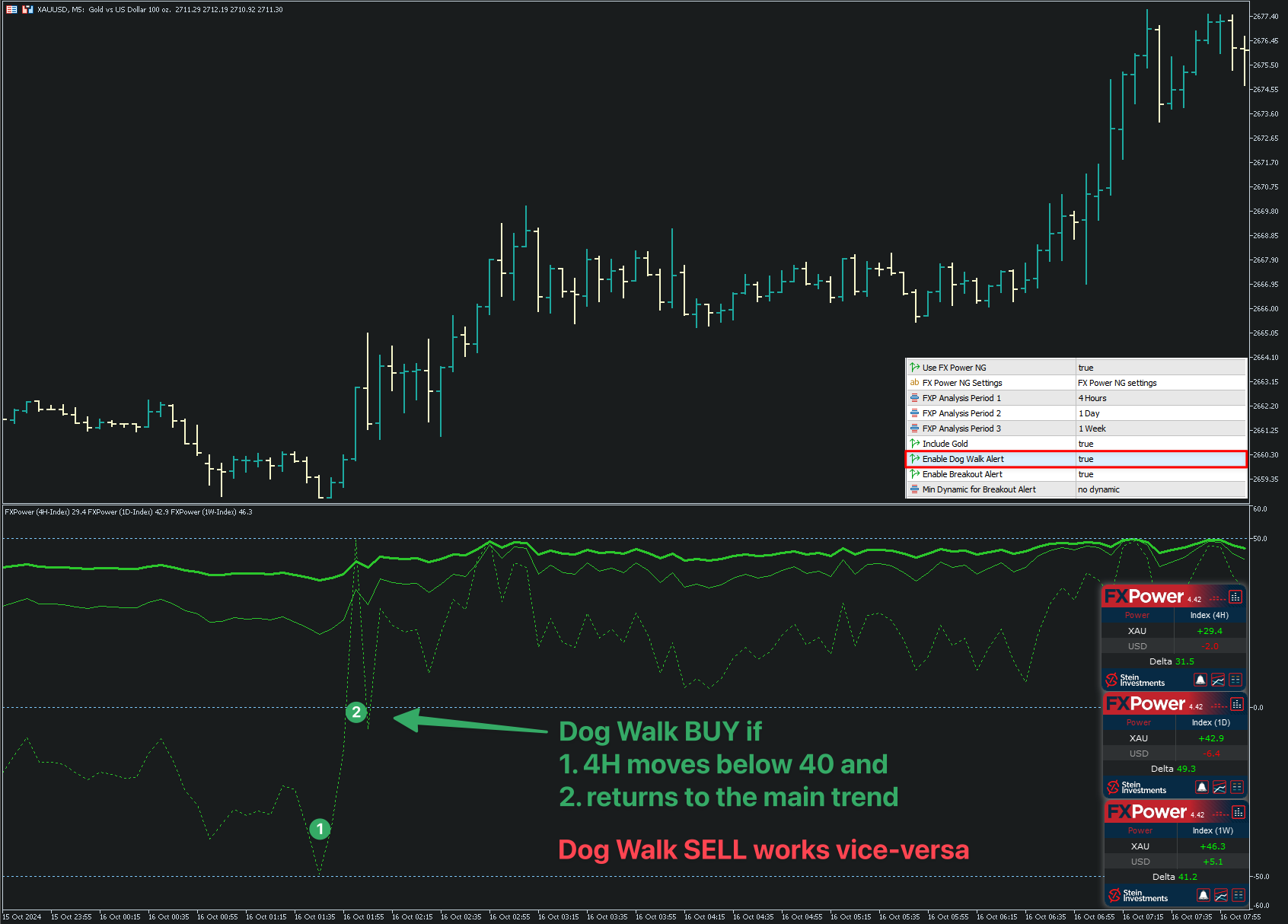
FX Power: DOG WALK Setup Alert
Based on the DOG WALK Strategy for trading Gold, this alert triggers when the short-term trend reverts back in line with the long-term trend after a brief move in the opposite direction.
*****
FX Power: Breakout Trading System Alert
Linked to our Breakout Trading System, Custom Alerts checks for line splits and ensures short-term dynamics support the breakout move. For higher-quality signals, you can enable extra filters like short-term dynamic, clear separation thresholds, Net Long/Total Volume changes, and more.
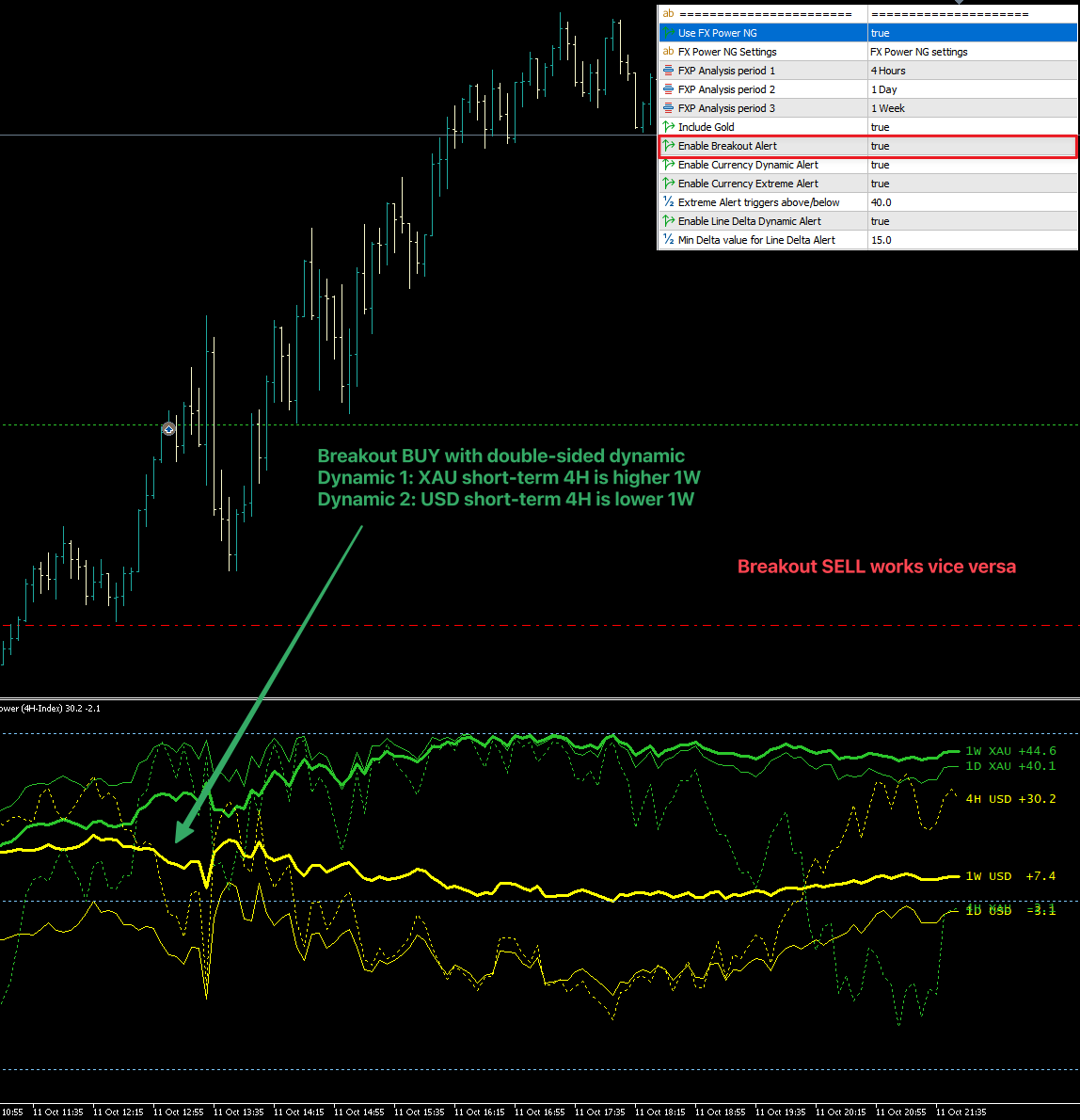
Since the very first version seen in this screenshot the Breakout Alerts have been improved a lot to increase the alert quality.
You can use the following options as additional filters/confirmations for the default Breakout Alerts.
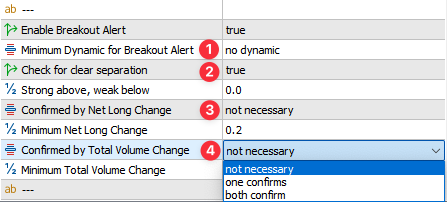
1. The short-term dynamic can be "no-dynamic, one-sided, or double-sided"
If you use "one-sided" at least one short-term trend (4H) needs to exceed it's long-term trend (1W)

Example: An AUDUSD BUY needs to be supported by either AUD 4H above AUD 1W or USD 4H below USD 1W.
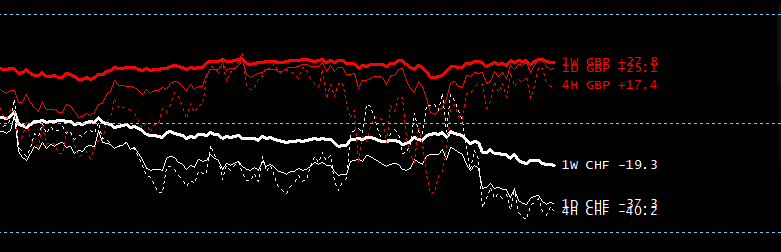
2. Enable clear separation to get higher quality signals.
If enabled, all lines of one currency must be above the defined value and all lines of the other currency must be below it.

For example: If set to 0.0, all AUD lines must be above 0.0 and all USD lines must be below.

Important:

The threshold works symmetrically on both sides, so if you set it to 5, it will be considered as minus 5 on the weak side.

For example: If set to 5, all AUD lines must be above 5 and all USD lines must be below minus 5.
This would be a typical example for the clear separation. All GBP lines are above 0 and all CHF lines are below 0
3. The Net Long Change can be "not necessary, one confirms, or both confirm"
If you use "one confirms" at least one Net Long Change needs to exceed the minimum value, and support the trade.

Example: An AUDUSD BUY needs to be supported by a positive AUD Net Long Change or negative USD Net Long Change.
- The Total Volume Change can be "not necessary, one confirms, or both confirm"
If you use "one confirms" at least one Total Currency Volume Change needs to exceed the minimum value.
Example: An AUDUSD BUY or SELL needs to be supported either by an increasing AUD volume or an increasing USD volume.
5. The Delta Filter option was an idea of our community, and we're happy to present it here.

You can choose between "not necessary" or one of the three FX Power Analysis Periods to check for short-term dynamic or long-term stability.
If you choose FXP AP3 the Delta between the history lines of the first and second currency of this pair needs to be above the Minimum value for this filter
Example: An AUDUSD BUY alert comes with an AUD strength of 25 and USD strength of 5. The Delta in this case is AUD 25 minus USD 5 = 20 -> no alert
As soon as the difference between those currency strength lines is above the customizable minimum of 30 you'll get an alert.
*****
FX Power: Dynamic & Extreme Alerts
- Dynamic Alert: Verifies short-term vs. long-term thresholds and sorting. Customizable values allow fine-tuning for your unique approach.
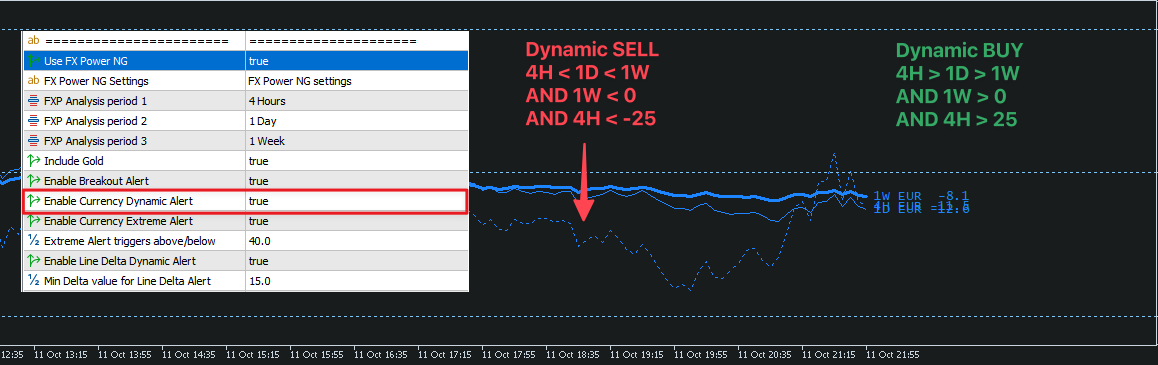
As requested by users, I opened up the thresholds for each instance and made them customizable.
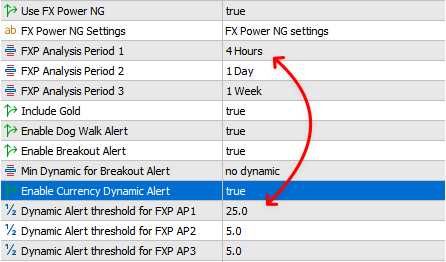
In this example you can see how they are related.
So the value of the first analysis period (4H) must be above 25, the second (1 day instance) must be above 5 and the third (1 week) also above 5.
These threshold values work in both directions. Thus, in a downtrend, the limits are -25, -5 and -5.
The only fixed condition is the line sorting (AP1 > AP2 > AP3 and vice versa in a downtrend), which is always checked, no matter what thresholds are set.
*****
- Extreme Alert: Checks if the trend reaches extreme levels beyond a specified limit.
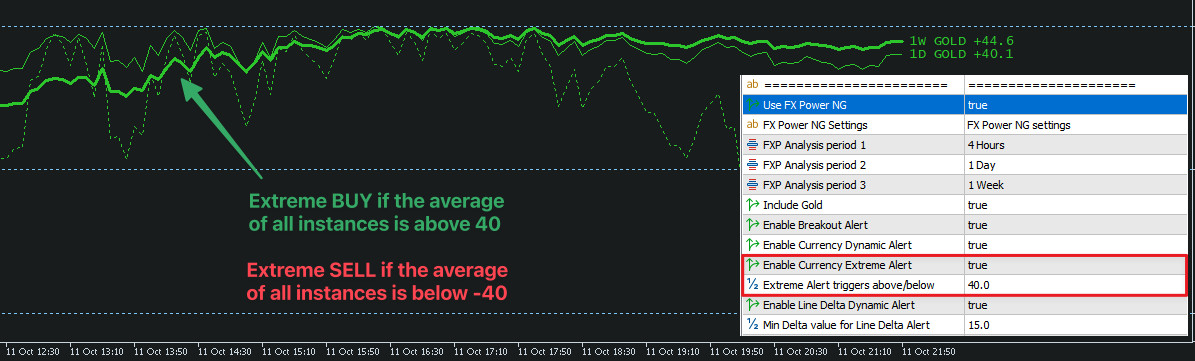
*****
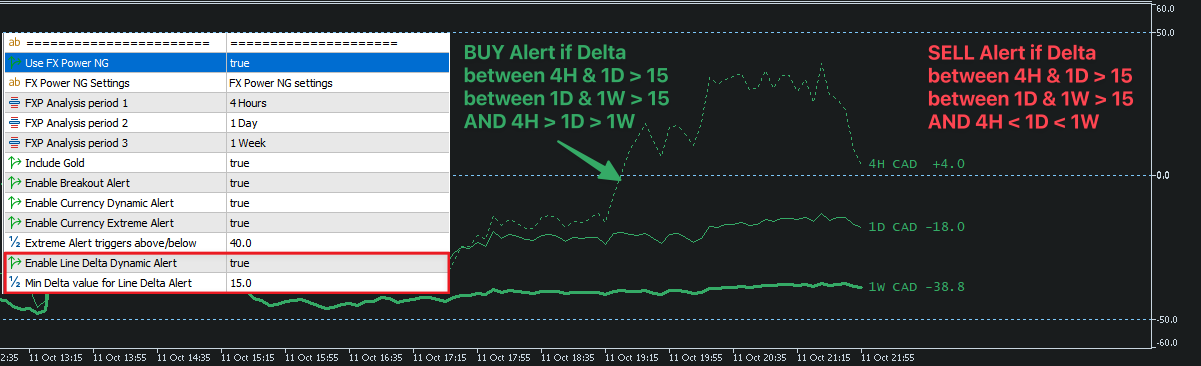
FX Power: Line Delta Alert
In this scenario we check the dynamic and distance between the strength lines
EXPERIMENTAL STRATEGY: FX Power Currency Correlation Alert
In this scenario we check for the strength or weakness of two correlated currencies, like AUD/NZD, CHF/JPY, EUR/GBP, and USD/CAD.

With these settings you'll get a
BUY ENTRY alert if, i.e. USD & CAD rise above 35 and a BUY EXIT alert if USD & CAD drop below 30.
SELL ENTRY alert if i.e. EUR & GBP drop below -35 and a SELL EXIT alert if EUR & GBP rise above -30.
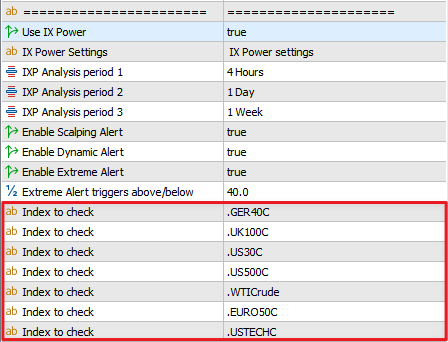
IX Power: Index Symbol List
For Custom Alerts to track index-based alerts, you must provide the exact symbol names according to your broker's listings. Broker naming varies widely, so precise input is essential.
*****
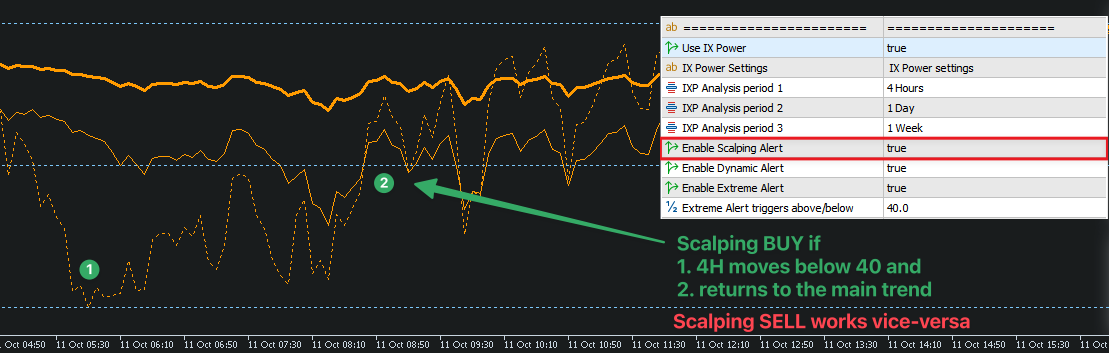
IX Power: Scalping Alert
Refers to our Easy Scalping with IX Power System, where a short-term move against the main trend is followed by an entry when price returns in line with the long-term trend.
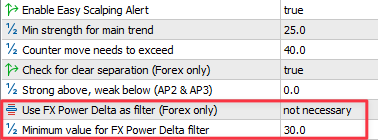
Based on our latest trading experience with the Easy Scalping Strategy on Forex symbols, we've introduced a new FX Power Filter options.
With this filter, Easy Scalping alerts align more effectively with the overall currency trend of the underlying symbol, improving trade quality. For non-Forex symbols, the filter is automatically ignored.
1. Enable clear separation to get higher quality signals.
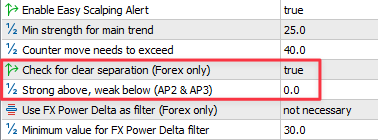
If enabled, all lines of one currency must be above the defined value and all lines of the other currency must be below it.
For example: If set to 0.0, all AUD lines must be above 0.0 and all USD lines must be below.
Important:
The threshold works symmetrically on both sides, so if you set it to 5, it will be considered as minus 5 on the weak side.
For example: If set to 5, all AUD lines must be above 5 and all USD lines must be below minus 5.
This would be a typical example for the clear separation. All GBP lines are above 0 and all CHF lines are below 0
- This option allows you to filter alerts based on the FX Power line delta from your selected analysis period.
*****
IX Power: Dynamic & Extreme Alerts
Similar to FX Power, Custom Alerts checks short-term vs. long-term thresholds and can notify you when the trend becomes dynamically aligned or hits extreme levels.
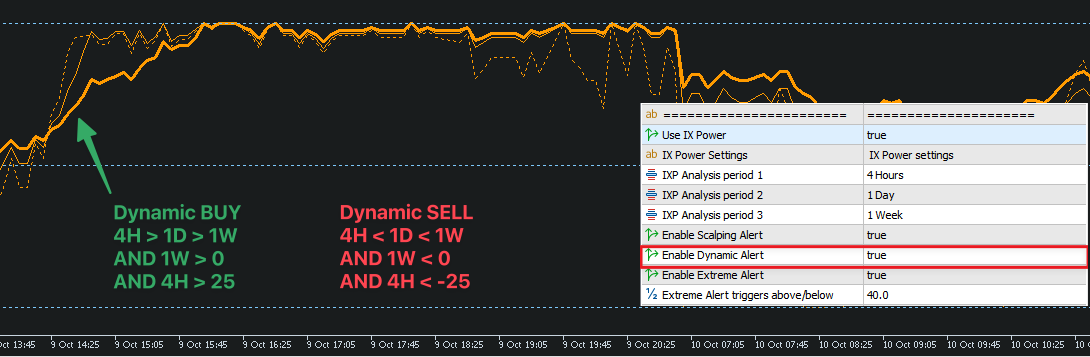
As requested by users, I opened up the thresholds for each instance and made them customizable.

In this example you can see how they are related.
So the value of the first analysis period (4H) must be above 25, the second (1 day instance) must be above 5 and the third (1 week) also above 5.
These threshold values work in both directions. Thus, in a downtrend, the limits are -25, -5 and -5.
The only fixed condition is the line sorting (AP1 > AP2 > AP3 and vice versa in a downtrend), which is always checked, no matter what thresholds are set.
*****
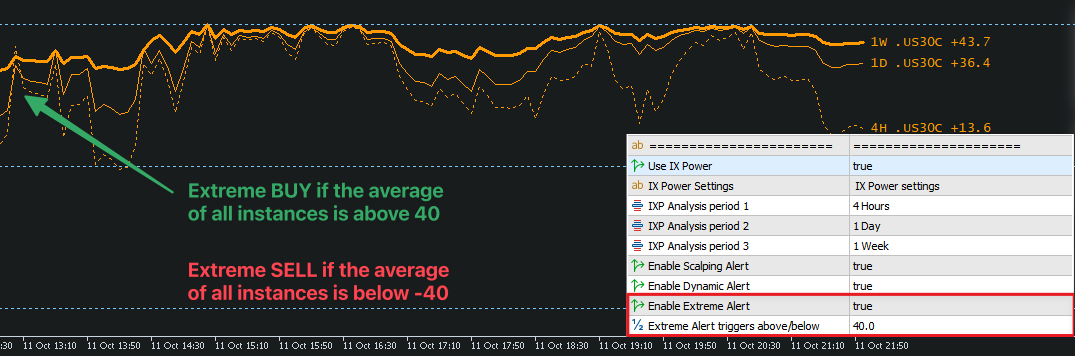
IX Power: Extreme Alert
In this scenario we check if the trend gets extreme
3. Best Practices & Final Notes
Run Only One Instance
For clarity and performance, we recommend running just one instance of Custom Alerts on a dedicated chart in the background. This ensures smooth operation and helps avoid duplicate notifications.
Do the Source Indicators Need to Be on a Chart?
No. Custom Alerts runs on a single chart and reads its source data in the background; nothing needs to sit on any other chart. What the standard version does need are the licenses of the sources your alerts actually use, installed in the terminal and enabled via their respective "Use ..." switches. If you only run FX Power alerts, FX Power is all you need. The AIO version has every source built in and works right away without additional installs.
Stay Tuned for More Alerts
We will continue adding new alert types to Custom Alerts based on user feedback. If you have an idea for a useful alert not yet available, feel free to reach out and send a screenshot with details.